---
title: Bulk Mailers
description: VetLinkPro Bulk Mailers
---
# VetLink PRO
Connecting Veterinary Professionals with Smarter Solutions
[Skip to content](https://help.vetlinkpro.com/vetlinkpro/bulk-mailers#main-content)
English - Australia
Show submenu for translations

Open main navigation
Close main navigation
- English - Australia
Show submenu for translations
- Contact us
Contact us
How can we help you?
- There are no suggestions because the search field is empty.
1. [VetLink PRO](https://help.vetlinkpro.com/vetlinkpro)
2. [Support](https://help.vetlinkpro.com/vetlinkpro/support)
3. [Mailers](https://help.vetlinkpro.com/vetlinkpro/support#mailers)
# Bulk Mailers
## v7,v6
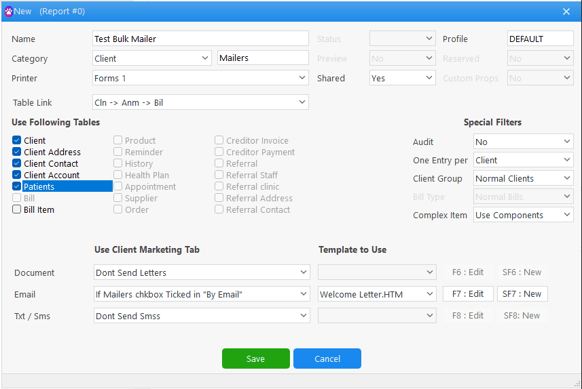
To create a Bulk Mailer in Vetlink first go to *Reports & Mailers \> Bulk Mailers \>* Now you will be on the *Client* tab \> Click *Add New* and select *Yes* to the confirmation popup
To set up the Bulk Mailer
- Enter a name for the mailer
- If wanting to print any letters, select *Forms 1* as the printer
- Set *Shared* to *Yes*
- Set *Table Link* to *Cln \> Amn \> Bil*
- Under *Use Following Tables* select the tickboxes for *Client, Client Address, Client Contact, Client Account,* and *Patients*
- Under *Special Filters*
- Set *One Entry Per* to *Client*
- Leave the others as default
- Under *Use Client Marketing Tab*
- For documents (printed), email and SMS you can set these to either
- Don't Send
- If Mailers chkbox ticked - this is set in the Marketing tab on a clients file, if they opt out of these communications, they would not receive this mailer
- If Address/Email/Mobile Entered - this will send to all clients if they have the details entered
- *Template to Use*
- For each communication type, you can use an existing template from the dropdown menu, the template can be edited using the *Edit* Button
- Or create a new template using the *New* button - please contact the helpdesk if requiring assistance for template creation
Next you want to set your filters for who this will be sent to. When you double click into your bulk mailer, you'll see the following window where you can set any filters required.
We recommend setting the Last Visit filter from a few years back to today's date (this will limit numbers to most/all active clients)
Once the filters have been set, click *Next* and verify that the client list has the correct document type selected that you wish to send. If there are any errors such as missing email addresses, these clients will appear in red.
Once your filters are set, click *Process.* A prompt will appear with the number of documents to be sent, to confirm you wish to send, click *Yes.*
[Bulk Mailer Video](https://www.youtube.com/watch?v=u8eism_K__U&feature=youtu.be)
- [Support](https://help.vetlinkpro.com/vetlinkpro/support#main-content)
- [Client Portal](https://help.vetlinkpro.com/vetlinkpro/support#client-portal)
- [Creditors](https://help.vetlinkpro.com/vetlinkpro/support#creditors)
- [Upgrade](https://help.vetlinkpro.com/vetlinkpro/support#upgrade)
- [Payments](https://help.vetlinkpro.com/vetlinkpro/support#payments)
- [Patient](https://help.vetlinkpro.com/vetlinkpro/support#patient)
- [Product](https://help.vetlinkpro.com/vetlinkpro/support#product)
- [Xero](https://help.vetlinkpro.com/vetlinkpro/support#xero)
- [Clinical History](https://help.vetlinkpro.com/vetlinkpro/support#clinical-history)
- [RDS Setup](https://help.vetlinkpro.com/vetlinkpro/support#rds-setup)
- [Client](https://help.vetlinkpro.com/vetlinkpro/support#client)
- [Diary](https://help.vetlinkpro.com/vetlinkpro/support#diary)
- [Mailers](https://help.vetlinkpro.com/vetlinkpro/support#mailers)
- [Exports](https://help.vetlinkpro.com/vetlinkpro/support#exports)
- [Stocktake](https://help.vetlinkpro.com/vetlinkpro/support#stocktake)
- [Reports](https://help.vetlinkpro.com/vetlinkpro/support#reports)
- [EOP / Statements](https://help.vetlinkpro.com/vetlinkpro/support#eop-statements)
- [Eforms / Digital Forms](https://help.vetlinkpro.com/vetlinkpro/support#eforms-digital-forms)
- [Other](https://help.vetlinkpro.com/vetlinkpro/support#other)
- [Printing](https://help.vetlinkpro.com/vetlinkpro/support#printing)
- [Email](https://help.vetlinkpro.com/vetlinkpro/support#email)
- [Server / Technical](https://help.vetlinkpro.com/vetlinkpro/support#server-technical)
- [Insurance](https://help.vetlinkpro.com/vetlinkpro/support#insurance)
- [Bill](https://help.vetlinkpro.com/vetlinkpro/support#bill)
- [Vac Reminders](https://help.vetlinkpro.com/vetlinkpro/support#vac-reminders)
- [Online Booking](https://help.vetlinkpro.com/vetlinkpro/support#online-booking)
- [Mobile Billing](https://help.vetlinkpro.com/vetlinkpro/support#mobile-billing)
- [Barcoding](https://help.vetlinkpro.com/vetlinkpro/support#barcoding)
- [SMS](https://help.vetlinkpro.com/vetlinkpro/support#sms)
- [General Ledger](https://help.vetlinkpro.com/vetlinkpro/support#general-ledger)
- [Staff](https://help.vetlinkpro.com/vetlinkpro/support#staff)
- [Telemedicine](https://help.vetlinkpro.com/vetlinkpro/support#telemedicine)
- [Manual](https://help.vetlinkpro.com/vetlinkpro/manual#main-content)
- [6.1](https://help.vetlinkpro.com/vetlinkpro/manual#6-1)
- [7.0](https://help.vetlinkpro.com/vetlinkpro/manual#7-0)
[](https://www.vetlinkpro.com)
[mailto:email@email.com](mailto:email@email.com)
Copyright © 2026, VetlinkPRO